


PH
Что?
Size: a a a
PH
МБ
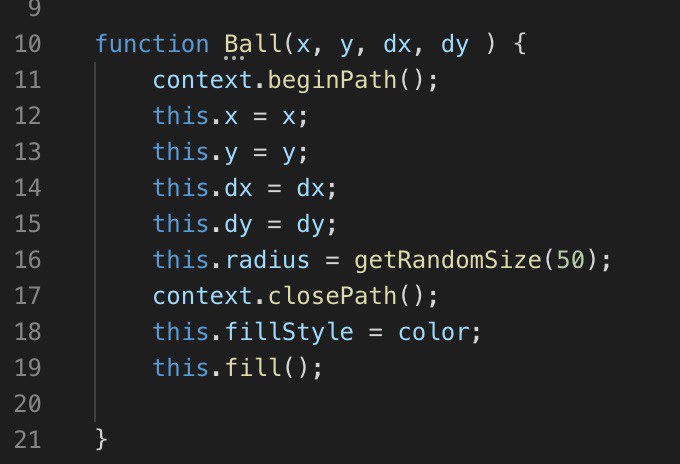
PH
VZ
PH
PH
VZ
МБ
PH
МБ
AH
PH
МБ

DE
function Ball(x, y, dx, dy) {
    this.x = x;
    this.y = y;
    this.dx = dx;
    this.dy = dy;
    this.color = randomColor(); // ←
    this.radius = randomSize(50);
}
еще правильнее будет передавать в конструктор размер и цвет, а не хардкодить их внутри.ctx.beginPath();
ctx.arc(ball.x, ball.y, ball.radius, 0, Math.PI*2);
ctx.lineWidth = 1;
ctx.closePath();
ctx.fillStyle = ball.color; // ←
ctx.fill();
ctx.stroke();DE
МБ
function Ball(x, y, dx, dy) {
    this.x = x;
    this.y = y;
    this.dx = dx;
    this.dy = dy;
    this.color = randomColor(); // ←
    this.radius = randomSize(50);
}
еще правильнее будет передавать в конструктор размер и цвет, а не хардкодить их внутри.ctx.beginPath();
ctx.arc(ball.x, ball.y, ball.radius, 0, Math.PI*2);
ctx.lineWidth = 1;
ctx.closePath();
ctx.fillStyle = ball.color; // ←
ctx.fill();
ctx.stroke();AB
МБ
function Ball(x, y, dx, dy) {
    this.x = x;
    this.y = y;
    this.dx = dx;
    this.dy = dy;
    this.color = randomColor(); // ←
    this.radius = randomSize(50);
}
еще правильнее будет передавать в конструктор размер и цвет, а не хардкодить их внутри.ctx.beginPath();
ctx.arc(ball.x, ball.y, ball.radius, 0, Math.PI*2);
ctx.lineWidth = 1;
ctx.closePath();
ctx.fillStyle = ball.color; // ←
ctx.fill();
ctx.stroke();ctx.fillStyle = ball.color; - вот это помогло)DE
ctx.fillStyle = ball.color; - вот это помогло)DE